
Spot the trap in every wrong answer.
Premiso is logical reasoning practice for iPhone and iPad. Each wrong choice is labeled with the trap it sets, so you learn why it looked right.
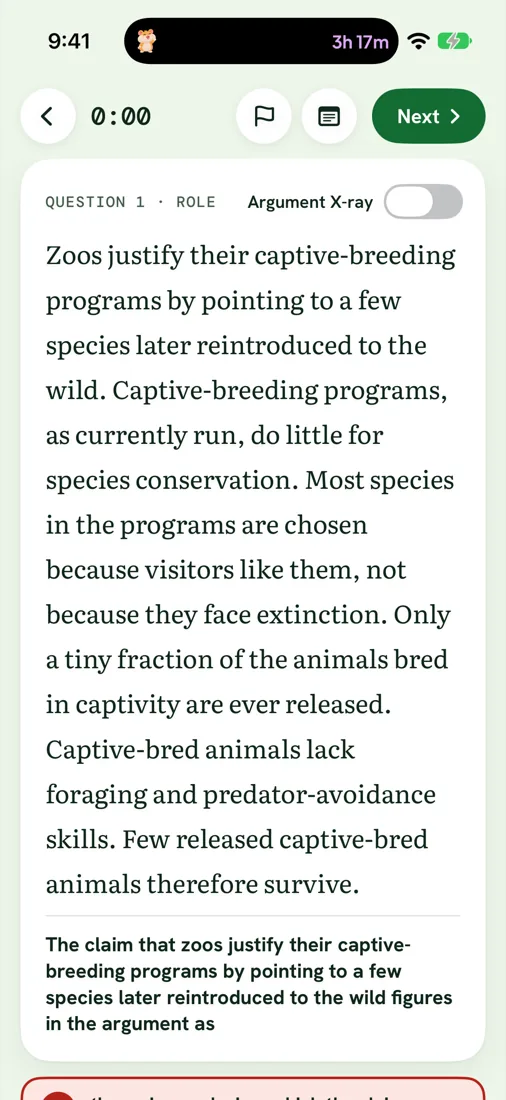


Argument X-ray
See the argument's skeleton.
Turn on Argument X-ray and the passage marks its conclusion, premises and assumptions. Read the structure first, then choose.
- One switch. Off when you want a clean read, on when you want to check your own.
- Built for the passage. Highlights sit in the text, not in a separate panel.
The new bridge will cut commute times. Traffic on the old bridge has doubled in ten yearsPremise, and every other city that built a second bridge saw congestion fallPremise. Therefore, the city should fund the new bridgeConclusion.
Trap labels and Trap profile
Every wrong answer has a reason.
After you answer, each wrong choice carries a label such as Out of scope, Too strong or Reversal. Premiso keeps count and shows which traps catch you most often.
- Labels on every choice, so a miss turns into something specific to fix.
- Trap profile in Progress ranks your habits across all question types.
EXAMPLE TRAP PROFILE

First pass, then a ruling on your own reasoning.
Timed section and Blind review
Practice the clock. Then review without it.
Run a 25-question timed section with a question grid and flags. When time is up, revisit flagged questions before any answers are shown. Premiso scores both passes.
Filled: answered. Outlined in orange: flagged. Dark ring: current.
Conditional trainer
Drill if-then logic until it is automatic.
Practice translating a statement, then forming its contrapositive and spotting the invalid mirror image. Short rounds you can do in a minute.
If rain, then wetIf not wet, then not rainIf wet, then rainFree vs Pro
Start free. Unlock everything once.
Pro is a one-time purchase. There is no subscription, and it works with Family Sharing.
Daily 5
- Daily 5 from four question types (Main point, Role, Flaw, Weaken), plus one Pro question a day
- All 16 Type guides and Conditional trainer level 1
- Streak and exam countdown
- Argument X-ray and trap labels
- Spaced review of what you missed
- Cato's wardrobe and badges
Everything, once
- All 16 question types and 320 questions
- Full Trap profile
- Timed sections with Blind review
- Every Conditional trainer level
One-time purchase. No subscription. Family Sharing included.
Private
Your practice stays yours.
No account
Open the app and start. Nothing to sign up for.
No ads
No ads and no trackers, in the app or on this site.
Works offline
Every question is on your device, so it works on the train and on the plane.
iCloud is optional
Turn on sync to keep progress across your devices, stored in your own iCloud. Read the privacy policy.
FAQ